Remote Commands in OpsRamp allow you to quickly retrieve key information about a resource — such as CPU usage, disk space, network details, and system status - directly from the OpsRamp portal, without needing to log in to the resource itself.
This is especially useful for IT administrators and operations teams who need to perform quick diagnostics, troubleshoot issues, or gather system information across multiple resources in real time.
What Can You Do with Remote Commands?
Monitor resource health - Check CPU, memory, and disk usage at a glance.
Troubleshoot connectivity - Run Ping, Trace Route, and NSLookup commands to diagnose network issues.
Inspect system details - View hostname, IP configuration, OS version, running processes, and services.
Execute custom commands - Run your own commands on resources with appropriate permissions.
Manage gateway resources - Execute Kubernetes and gateway-specific commands on NextGen and Classic gateways.
Prerequisites
Before you can use Remote Commands, ensure the following requirements are met:
Required Packages and Add-ons
Users must have the Remediation and Automation package enabled.
Users must have the Remote Access Management Add-on activated.
Required Permissions
Category
Permission Type
Permissions
Account Administration
Devices
View / Edit / Create / Manage
Remote Access
Commands
Allow to Run Commands
Note
Without these permissions, the Remote Commands option will not be visible in the OpsRamp portal.
How to Execute a Remote Command
Follow these steps to run a remote command on one or more resources:
Navigate to Infrastructure → Search in the OpsRamp portal.
On the Infrastructure search page, search for the resource(s) using resource categories, resource groups, sites, or a custom query.
Select the resource(s) using the checkboxes.
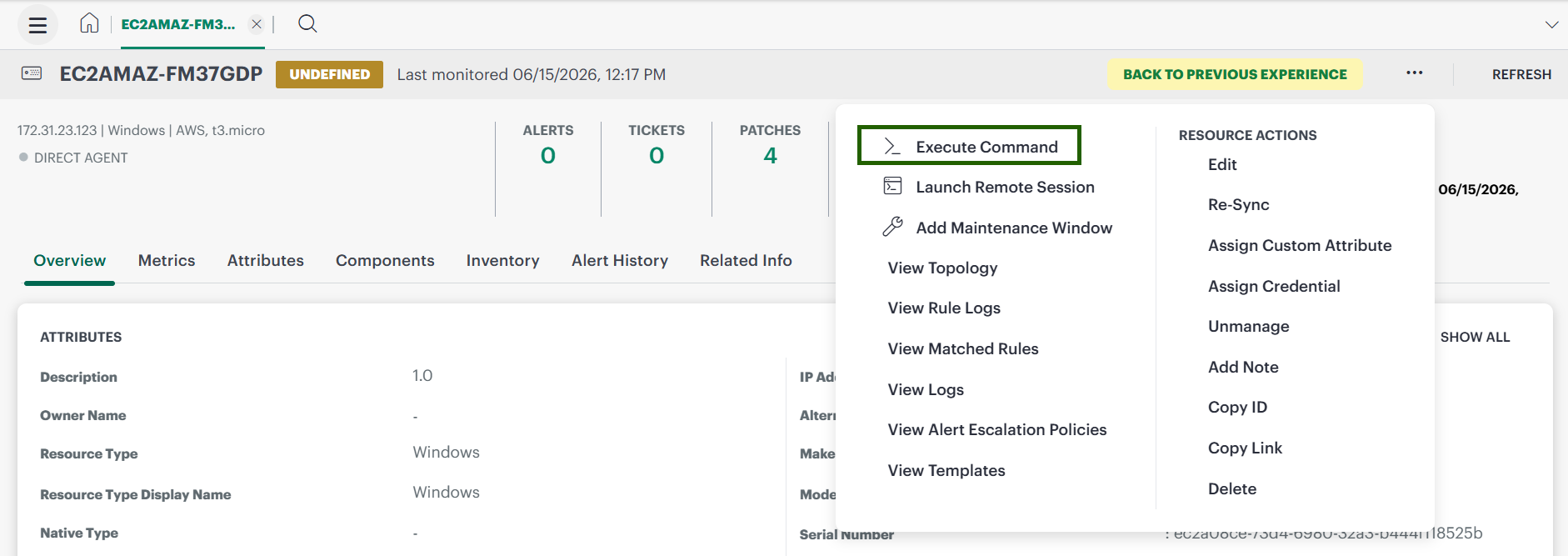
Click the Actions menu and select Execute Command.
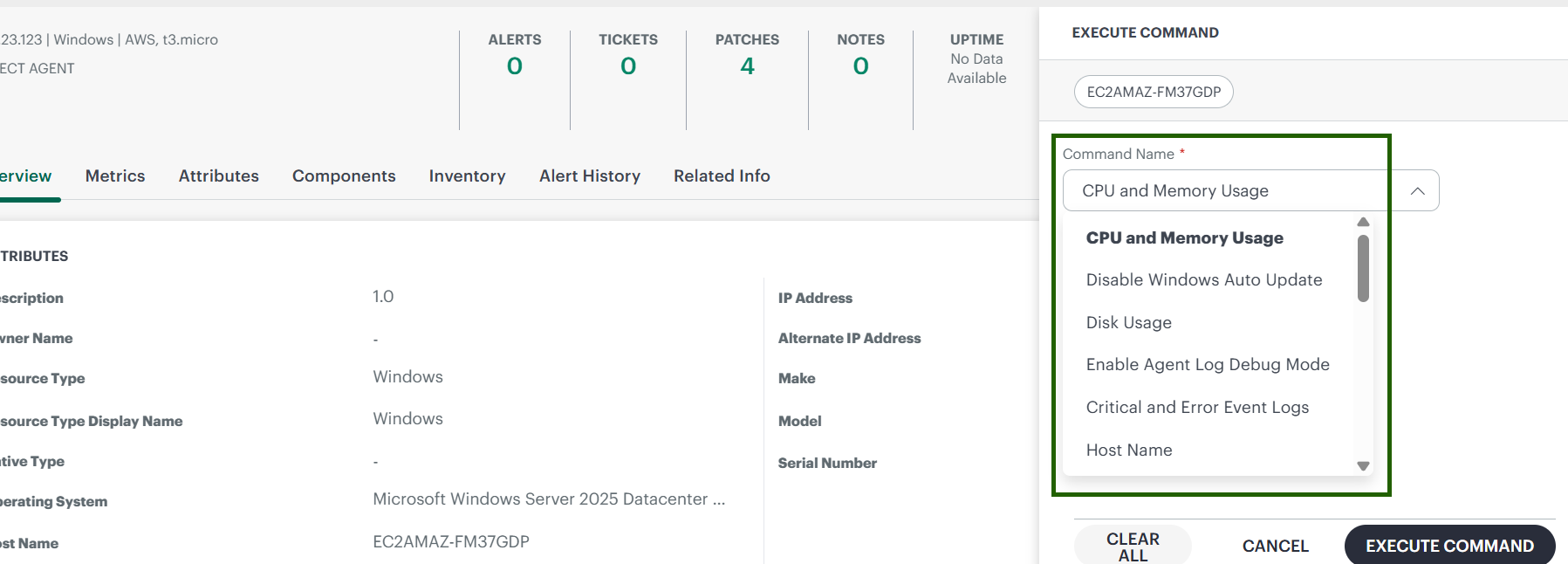
In the Execute Command popup:
Choose a command from the Command Name dropdown.
Click Execute Command to run it.
The command output appears in the results pane. Review the output for the diagnostic information you need.
Agent Remote Commands
System Information Commands
Remote Command Name
Description
Windows
Linux
CPU and Memory Usage
Retrieves the current CPU and memory utilization of the resource, helping you quickly identify whether a resource is under heavy load.
✅
✅
Disk Usage
Retrieves disk space usage across all mounted drives or partitions, showing total, used, and available space.
✅
✅
Hostname
Returns the hostname of the resource as configured on the operating system.
✅
✅
IPConfig
Retrieves the IP address configuration of the resource, including assigned IP addresses, subnet masks, and default gateways.
✅
✅
System Info
Returns detailed system information including hostname, OS name, OS version, architecture, and other platform-level details.
✅
✅
System Status
Provides system status information such as hostname, OS name, OS version, and overall health indicators.
✅
❌
Processes
Lists all currently running processes along with basic details such as process ID, CPU usage, and memory consumption.
✅
✅
Services
Lists all installed services and their current status (running, stopped, etc.), helping you verify that critical services are operational.
✅
✅
Network Diagnostics Commands
Remote Command Name
Description
Windows
Linux
Ping
Tests network connectivity to a specified IP address or hostname by sending ICMP echo requests. Useful for verifying whether a target host is reachable.
✅
✅
Trace Route
Displays the network path packets take to reach a specified destination, showing each hop and the transit delay at each point. Useful for identifying where network latency or packet loss occurs.
✅
✅
NSLookup
Queries the Domain Name System (DNS) to obtain domain name-to-IP address mappings or other DNS records. Useful for diagnosing DNS resolution issues.
✅
✅
Agent Management Commands
Remote Command Name
Description
Windows
Linux
Restart Agent
Restarts the OpsRamp agent service on the resource. Use this when the agent becomes unresponsive or after configuration changes that require a service restart.
✅
✅
Restart Remote Agent
Restarts the OpsRamp agent on a remote Windows resource. You must provide the remote RDP credentials when executing this command.
✅
❌
Enable Agent Log Debug Mode
Temporarily enables debug-level logging on the agent. Select a duration from the dropdown (10, 30, or 60 minutes). Once the selected duration expires, the agent log level automatically reverts to WARNING.
✅
✅
Show Recent Agent Log
Retrieves the most recent agent log entries. Select the number of lines to retrieve from the dropdown: 100, 200, or 500 lines.
✅
✅
Internal Agent Command
Executes internal agent operations for advanced diagnostics. Available options: SYNC_MONIT_CONFIGS (synchronizes monitoring configurations) and POST_INVENTORY (posts the latest inventory data to OpsRamp).
✅
✅
Windows-Specific Commands
Remote Command Name
Description
Disable Windows Auto Update
Disables the Windows automatic update service on the resource. Useful in environments where updates are managed through a centralized patch management process.
Critical and Error Event Logs
Retrieves a list of Critical and Error-level events from the Windows Event Log for the specified time period. Helps identify recent system or application failures.
RDP and VNC Options
Checks whether Remote Desktop Protocol (RDP) and Virtual Network Computing (VNC) are enabled on the resource. Useful for verifying remote access readiness before initiating a remote session.
Remote System Info
Retrieves system information from a remote Windows device, including hostname, OS name, OS version, and other configuration details.
Custom Command Execution
Remote Command Name
Description
Supported OS
Execute a Command
Allows you to run a custom command on the resource. This option is available to Partner and Client users only. See the Restricted Commands section below for commands that are blocked due to security considerations.
Windows, Linux
Restricted Commands for “Execute a Command”
When using the Execute a Command option, certain commands are restricted because they could cause system disruption, enable unauthorized access, or compromise security. OpsRamp blocks the following commands to protect your infrastructure.
Info
Even commands that are not on this restricted list should be used with caution. Always verify the impact of a command before executing it on production resources.
Shells and Scripting
Command
Why It's Restricted
bash, sh, pdksh, tcsh, [sabckz]sh
Unix shells that can execute arbitrary shell commands or scripts, potentially allowing full system access.
alias
Creates shortcuts for commands that can hide malicious behavior by masking the actual command being executed.
powershell, cscript
Windows scripting environments (PowerShell for automation and cscript for VBScript/JScript) that allow powerful and potentially dangerous system-level operations.
Programming language interpreters and compilers that could be used to execute malicious scripts or compile unauthorized code.
Networking and Remote Access
Command
Why It's Restricted
nc, ncat
Netcat tools used for reading and writing data over TCP/UDP connections. Commonly exploited for reverse shells and port scanning.
wget, curl
Download files from the internet and are often used to fetch and execute remote scripts or malicious executables.
scp
Securely copies files over SSH and could be used for unauthorized data exfiltration.
telnet
Legacy remote access protocol that lacks encryption and poses significant security risks.
netstat
Displays active network connections and open ports, potentially revealing network topology information.
traceroute
Traces the network path to a destination, which can expose internal network architecture.
System and File Operations
Command
Why It's Restricted
rm, del, delete, format, reset
File deletion, disk formatting, and system reset commands that are potentially destructive and irreversible.
reboot, logoff, shutdown
System availability commands that can disrupt services and cause downtime.
mkdir, pwd, ls, chmod, chown
Filesystem manipulation commands that can create directories, change file permissions, or alter file ownership.
apt install
Package installation command that could introduce malicious tools or unauthorized software.
Execution and Process Management
Command
Why It's Restricted
kill
Terminates running processes and can be used maliciously to stop monitoring agents, security tools, or critical system services.
socat
A bidirectional data relay commonly used in advanced reverse shell setups for unauthorized remote access.
doskey *=*
Windows command aliasing tool that can mask malicious commands behind innocent-looking aliases.
crontab -r
Removes all scheduled cron jobs for a user, resulting in a disruptive and potentially destructive action.
systemctl
Controls systemd services on Linux and can start, stop, restart, or disable services, including security and monitoring tools.
Gateway Remote Commands
In addition to standard agent remote commands, OpsRamp supports a set of gateway-specific commands that can be executed through the agent installed on NextGen and Classic gateways. These commands are designed for gateway-level diagnostics, including Kubernetes pod management and gateway service monitoring.
Note
These commands are accessible to user types - Partner, and Client.
Required Permissions
The following permissions are required to view and run the commands.
Category
Permission Type
Permissions
Account Administration
Devices
Manage
Collectors
Manage Management Profile
Manage
Remote Access
Commands
Allow To Run
NextGen Gateway Commands
These commands allow you to inspect and manage Kubernetes resources running on a NextGen gateway.
Note
You can run these commands only on resources monitored by agent installed on NextGen gateway.
Remote Command
Description
Kubectl Get Pods
Lists all Kubernetes pods running on the NextGen gateway, including their status, restart count, and age.
Kubectl Get Services
Lists all Kubernetes services on the NextGen gateway, showing service type, cluster IP, and exposed ports.
Kubectl Get PVC
Lists all Kubernetes Persistent Volume Claims (PVCs) on the NextGen gateway, showing storage capacity and binding status.
Kubectl Get Nodes
Lists all Kubernetes nodes on the NextGen gateway, displaying node status, roles, and resource capacity.
Kubectl Top Pods
Displays real-time CPU and memory usage for each pod running on the NextGen gateway.
Kubectl Top Pods NextGen Gw Containers
Displays real-time CPU and memory usage at the container level within NextGen gateway pods, providing more granular resource visibility.
Kubectl Describe Pod NextGen Gw
Runs kubectl describe on the NextGen gateway pod, providing detailed information including events, resource limits, and container status.
Kubectl Describe Pod NextGen Gw Redis Master
Runs kubectl describe on the Redis Master pod within the NextGen gateway, showing configuration and event history.
Kubectl Describe Node
Runs kubectl describe on the Kubernetes node hosting the NextGen gateway, showing node conditions, allocated resources, and running pods.
Kubectl Delete Pod NextGen Gw
Deletes a specified pod on the NextGen gateway. Kubernetes automatically reschedules a replacement pod. Use this command to recover from a stuck or failed pod.
Show Recent NextGen GW Vprobe and TLS Logs
Retrieves the most recent vprobe and vprobe TLS logs from the NextGen gateway. Select the number of log lines to retrieve (for example, 100 lines returns the last 100 lines from both logs).
Classic Gateway Commands
These commands allow you to inspect and manage Kubernetes resources running on a classic gateway.
Remote Command
Description
Monit Summary
Displays the status of all Classic Gateway services monitored by Monit, including vprobe, web probe, Django, nginx, and other services. Use this command to quickly verify that all gateway components are running.
Show Recent Classic GW Vprobe Logs
Retrieves the most recent vprobe logs from the Classic Gateway. Select the number of lines to display (for example, 100 lines returns the last 100 log entries).
Show Recent Classic GW VprobeTLS Logs
Retrieves the most recent vprobe TLS logs from the Classic Gateway. Select the number of lines to display (for example, 100 lines returns the last 100 log entries).
Openssl
Executes openssl s_client to connect to a remote host using SSL/TLS. Useful for diagnosing SSL certificate issues, verifying TLS configurations, and testing secure connectivity from the gateway.
Vprobe Restart
Restarts the Classic Gateway vprobe service (the core monitoring service). Use this command when vprobe becomes unresponsive or after configuration changes.